Best Video Editing Course in Phagwara
Master cinematic video production at Big Brains Computer Institute — Phagwara's premier center for Adobe Premiere Pro CC, DaVinci Resolve 4K Color Grading, After Effects Motion Graphics, CapCut AI & YouTube/Reels Editing. 100% practical editing on high-speed workstations.
Why students choose us
- Adobe Premiere Pro CC Multicam & Timeline Mastery
- DaVinci Resolve 4K Color Grading & LUTs
- After Effects VFX & Lower Third Titles
- YouTube Vlogs, Wedding Teasers & Reels Editing
- Online Verifiable ISO Certificate
#1 Video Editing & Motion Graphics Institute in Phagwara
Established in 2019 under Managing Director Mr. Satinder Singh, Big Brains Computer Institute (located on First Floor, Ohri Building near Sugar Mill Chowk, Phagwara Bus Stand) is Phagwara’s leading ISO 9001:2015 certified video production institute with a 5.0-star rating across 174+ Google reviews. Big Brains provides 100% practical editing studio training in Adobe Premiere Pro CC, DaVinci Resolve 4K color wheels, After Effects VFX & motion graphics, CapCut AI automated subtitles, audio cleaning, and wedding cinematic editing with online verifiable certificates and 100% placement support.
Professional Video Editing Course in Phagwara
Looking for the best video editing course in Phagwara? Welcome to Big Brains Computer Institute — an ISO-certified media training center near Phagwara Bus Stand. Video editing is one of the highest-demand digital skills for YouTube creators, wedding video studios, advertising agencies, and social media influencers.
Master non-linear editing in Adobe Premiere Pro CC, professional Hollywood-grade 4K color correction in DaVinci Resolve, motion graphic titles & green screen keying in After Effects, and viral vertical video editing in CapCut Pro.
Guided by professional video editors, you edit real raw camera footage and build an impressive video showreel portfolio.
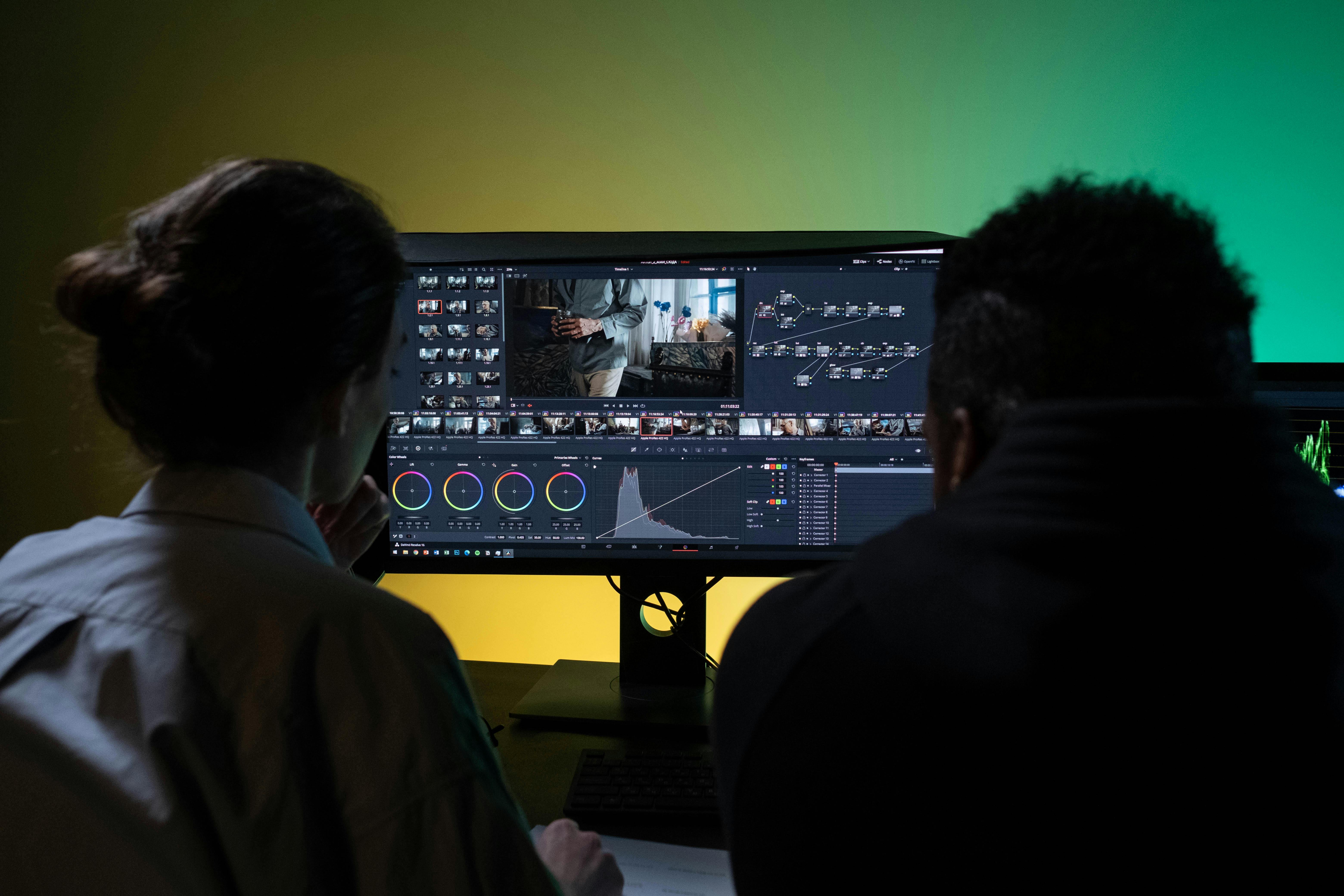
Why We Are Phagwara's Preferred Video Editing Studio
Practical, project-based, and creative video editing training built for real industry success.
Adobe Premiere Pro CC
Master multi-track timeline cuts, J/L cuts, speed ramping, multicam editing, and transitions.
DaVinci Resolve 4K Color
Learn primary & secondary color wheels, Lumetri color, node workflows, and custom LUT grading.
After Effects Motion Graphics
Create lower-third titles, logo animations, green screen chroma keying, and visual effects.
Wedding & Event Editing
Edit cinematic pre-wedding teasers, Punjabi wedding highlights, and multi-camera event video reels.
YouTube & Reels Content
Master fast-paced jump cuts, animated captions, sound effects sync, and engaging B-roll overlays.
Verifiable ISO Certificate
ISO-recognised video editor certificate you can verify online — trusted by media studios.
Course Curriculum — 16 Practical Editing Modules
The most comprehensive video editing & motion graphics syllabus in Phagwara. Click any module to see inside.
Video Editing Fundamentals & Storytelling
+Understand video frame rates (24fps, 30fps, 60fps), resolutions (1080p, 4K), aspect ratios (16:9, 9:16, 1:1), and storytelling flow.
- Principles of video montage & visual pacing
- Understanding codecs (H.264, H.265, ProRes)
- Project organization & raw footage binning
- Setting up editing workspaces in Premiere Pro
Adobe Premiere Pro — Timeline & Cutting Tools
+Master Razor tool, Ripple Edit, Rolling Edit, Slip/Slide tools, J-Cuts, L-Cuts, and keyboard shortcuts for rapid editing.
- Razor, Ripple & Rolling Edit tools
- J-Cut & L-Cut seamless audio transitions
- Three-point & four-point editing techniques
- Customizing keyboard shortcuts for speed
Speed Ramping & Motion Control
+Learn slow motion (slomo), fast motion, time remapping, speed ramps, and frame sampling (Optical Flow vs Frame Sampling).
- Time Remapping curve editing in Premiere
- Optical Flow for smooth ultra-slomo video
- Freeze frames & reverse video effects
- Syncing speed ramps with music beats
Multi-Camera Video Editing
+Learn multi-camera angle synchronization using audio waveforms, switching active camera angles live in real-time.
- Audio waveform auto-synchronization
- Multi-camera source sequence creation
- Live switching between 3-4 camera angles
- Editing live musical shows & interviews
Audio Mixing & Voiceover Enhancement
+Clean background noise, equalize voiceovers, duck background music under speeches, and apply sound effects (SFX).
- Audio Essential Sound panel in Premiere
- Noise reduction & EQ voice polishing
- Audio Ducking under dialogue tracks
- Adding cinematic sound effects (Whoosh, Riser, Impact)
Lumetri Color — Basic Color Correction
+Master white balance, exposure adjustment, contrast, highlights/shadows, and matching colors across different camera clips.
- Reading Vectorscopes, Histogram & Waveforms
- Fixing overexposed & underexposed video clips
- Matching color tone across multi-camera shoots
- Skin tone protection using HSL Secondary
DaVinci Resolve — Advanced 4K Color Grading
+Learn DaVinci Resolve color page, primary/secondary wheels, node tree architecture, qualifiers, and applying cinematic LUTs.
- Node-based color grading in DaVinci Resolve
- Primary Lift/Gamma/Gain color wheels
- Qualifiers & tracking windows for isolated color edits
- Applying & customizing Hollywood cinematic LUTs
After Effects — Motion Graphics & Titles
+Create animated lower-third titles, text typography reveals, logo stings, and Essential Graphics templates (.mogrt).
- Keyframe animation & Easy Ease curves
- Lower-third title animation in After Effects
- Creating reusable Mogrt templates for Premiere
- Animating shapes, lines & badges
After Effects — Chroma Keying & VFX
+Master green screen background removal (Ultra Key & Keylight), 3D camera tracking, mask rotoscoping, and particle effects.
- Green screen Keylight 1.2 chroma keying
- Spill suppression & edge refinement
- 3D Camera Tracker for placing text in real 3D video
- Masking & Rotoscoping objects out of video
YouTube Vlog & Documentary Editing
+Learn editing high-engagement YouTube vlogs, travel videos, tutorials, adding pop-up graphics, memes, and B-roll overlays.
- Pacing cuts for maximum audience retention
- Adding graphic popups, sound effects & meme clips
- Designing click-worthy YouTube Video Thumbnails in Photoshop
- End screen & card placement strategies
Instagram Reels & TikTok Short Video Editing
+Master 9:16 vertical video editing, auto-generating kinetic subtitles, zoom-in cuts, and trending sound synchronization.
- 9:16 vertical video composition & safe zones
- Dynamic auto-captions & kinetic text overlays
- Fast-paced hook cuts within first 3 seconds
- CapCut Pro AI features & video effects
Wedding & Event Cinematic Video Editing
+Learn Punjabi wedding video editing, pre-wedding romantic teasers, reception highlights, and slow-motion emotional cuts.
- Storyboarding wedding teaser videos
- Selecting romantic & Punjabi beats for cuts
- Cinematic color grading for wedding footage
- Exporting full 4K wedding video packages
CapCut AI & AI Video Generation Tools
+Learn AI-powered video editing tools: CapCut AI subtitle generator, background remover, text-to-speech, and Runway AI.
- Automated auto-captioning & translation
- AI voiceover generation & audio clarity tools
- Background removal without green screen
- Using AI video enhancers for low-res footage
Exporting, Rendering & Codec Optimization
+Master render settings for YouTube, Instagram, TV broadcasts, bitrate control (CBR vs VBR 2-pass), and batch rendering.
- Media Encoder batch rendering queue
- Bitrate optimization for 1080p & 4K uploads
- Exporting transparent PNG sequences & Alpha videos
- Compressing large videos without losing quality
Showreel Building & Portfolio Creation
+Compile your best editing projects into a professional 60-second video showreel to send to prospective employers & clients.
- Curating your best video cuts & visual effects
- Editing a high-energy showreel promo video
- Uploading showreel to YouTube, Behance & Drive
- Pricing video editing projects for freelance clients
Client Pitching & Job Placement Support
+Build your freelance editor profile, practice video editor job interviews, and get 100% placement support with studios & agencies.
- Drafting video editing service packages & rates
- Finding remote video editing clients internationally
- Preparing for technical editing tests
- 100% placement support with media production houses
Master Modern Video Editing Tools
We train you on the exact software used by Hollywood editors, wedding studios & top YouTubers.
Premiere Pro
DaVinci Resolve
After Effects
CapCut & Reels
10+ Video & VFX Tools You Will Master
Hands-on experience with industry-standard media software.
Adobe Premiere Pro CCDaVinci Resolve 4KAdobe After EffectsCapCut Pro AIAdobe AuditionAdobe PhotoshopMedia EncoderLumetri ColorChroma KeyRunway AIJobs You Can Apply For
After completing this course, you can start a career as a:
Professional Video Editor
YouTube Channel Editor
Colorist (DaVinci Resolve)
Motion Graphics Artist
Wedding Teaser Editor
Instagram Reels Specialist
Freelance Video Editor
Media Studio Operator
Course Fees & Duration
Book a free demo class first — decide only after you've seen a live class.
Start With a Free Demo
Meet the video editing trainers, sit in a live editing workstation class, and decide only after you've seen it yourself — zero commitment.
💳 Affordable course fee with easy EMI options.
Watch Our Students' Reviews
Hear directly from Big Brains students on our YouTube channel.
"Big Brains is the best computer institute in Phagwara for video editing. I learned Premiere Pro, DaVinci Resolve color grading and started editing wedding teasers!"
"The best computer centre in Phagwara. The trainers helped me learn After Effects motion graphics & Reels editing step-by-step."
"One of the best video editing centres in Phagwara. 100% practical lab workstations with heavy GPUs for smooth rendering."
Frequently Asked Questions
Common questions about our video editing course in Phagwara.
Big Brains Computer Institute, near Phagwara Bus Stand, offers the best video editing course in Phagwara. It is an ISO-certified institute with 100% practical training in Adobe Premiere Pro CC, DaVinci Resolve 4K Color Grading, After Effects Motion Graphics & Reels editing.
Yes! You will learn node-based color grading, color wheels, vector scopes, and cinematic LUT application in DaVinci Resolve.
The fee is affordable and flexible with easy EMI options. For the latest fee structure and discount offers, call +91 84272-34590 or book a free demo class.
The course duration is 2 to 3 months with daily practical editing on high-performance GPU workstations.
Yes. We provide 100% placement assistance, showreel portfolio building, and connect students with media studios, YouTubers, and advertising agencies.
Yes. Punjabi wedding teasers, pre-wedding highlights, YouTube vlogs, and 9:16 Instagram Reels are fully covered in the practical syllabus.
Yes. Attend a free 2-day demo class to experience live video editing before enrolling.
Ready to Start Your Professional Video Editing Career?
Join the best video editing & motion graphics institute in Phagwara. Book your free demo class today.
Call +91 84272-34590 WhatsApp Us